Modifying Pinball GI Circuits for DC Part 1: WPC95 Theory

/EDIT: UPDATE: This did not really work out as planned, need to look at the data on the scope and see exactly what is happening with these SCR’s…

So the theory was incorrect :sadface:


I am going to do a series of articles on modifying Pinball GI circuits for DC (to run LEDs instead of incandesant lamps) in order to get rid of annoying 60hz strobing/flicker.

Part 1: Williams WPC95

The Williams WPC95 was the last of William’s pinball machines board systems (before Pinball 2000). The board used 3 TRIACs to control 3 GI circuits each capable of driving 18 lamps and 2 “always on” circuits generally used for the backbox (boring! more on that later).

Ok so here is a quick GI block diagram/theory of operation from a WPC95 game manual. Data from the CPU board comes in via J102, selects a 74LS374, which drives a MPSD52 (2N5401) which then drives a TRIAC that lets the AC flow from J103 (6.3VAC secondary from power transformer) to J105 which goes to the controlled GI lamps.

(Click for larger version)

Here is the actual relevant part of the WPC95 schematic (from the WPC95 manual). You can see the three data lines coming from U2 (74LS374), driving the three MPSD52 (2N5401) and then driving the three TRIACs. TRIACs are pretty neat devices, basically like a transistor but for AC instead of DC (see: http://en.wikipedia.org/wiki/TRIAC), but since we want to use DC for our GI LEDs they need to go. If you notice the general layout of this circuit is very similar to other repeating circuts on the Power Driver board including the solenoid and general purpose driver outputs, so we are basically just going to copy those and insert them in place of the original TRIAC based one.

Doing that gives us this

(Click for larger version)

Ok so here we have replaced the TRIAC (Q3, Q4, Q5) with TIP102s (for the sake of keeping things the same) one important thing to note immediately is that the TIP102 does *NOT* have the same pinout as the BT138E TRIACs we are removing, so the easiest way to deal with that is simply mount the transistor onto the heatsink upside down, and solder some bits of wires to the leads and then run those leads to the pads on the board in the correct order. You also need to add a 2.7K resistor between the Base and Emitter of the TIP102 as indicated in the schematic, you can just attach the resistor straight to the transistor between pins 1 and 3.

Additionally the following needs to be done to the board:

The 560 ohm resistors at R24/R18/R21 need to be replaced with 470 ohm resistors

The 51 ohm resistor at R26/R20/R23 need to be replaced with 68 ohm resistors AND a 1N4004. Simply attach both devices to each other in a V shape and then insert in place of R26/R20/R23

Additionally (and not pictured in the schematic) you can add some large capacitors on the output of the TIP102s to try and smooth out the PWM that Williams machines use to “dim” the GI circuits, with LEDs you just get a really noticeable strobing instead of the desired dimming, but adding a large cap should “smooth out” the PWM enough to at least suppress the strobing to tolerable levels.

Finally and a very important note, you can NOT put AC straight into this circuit, it either requires separate rectification/filtering/regulation of the GI secondary coming from the main power transformer, or a small DC switching supply which is what I generally use. Small 5v switchers are readily available and provide a “5v” adjust which usually gives you a little play in the output voltage, allowing you to dim or brighten the GI LEDs as desired.

Pictures of the actual modifications coming soon!

Thursday, July 19th, 2012 Uncategorized No Comments

Tales of the Arabian Nights & Playchoice 10

Have 2 new items in the collection, first is my grail pin, Tales of the Arabian Nights, an excellent top 10 Williams machine from 1996… Unfortunately it has quite a bit of insert issues, with many of them flaking off, and/or becoming raised from the playfield. Fortunately you can buy replacement insert decal sets so its not beyond saving (like the inserts on my  Bram Stoker’s Dracula pinball). I currently installed an LED kit from Cointaker but the kit included purple (?) general illumination LEDs which really ruin the look of the game, so going to have to order some regular warm white LEDs. Additional upcoming mods include making the backbox lights animated (originally they were just always on) which will be possible since the LEDs draw significantly less power I can tie them into the play field GI circuits.

Which brings us to another issue, Williams machines use SCRs to dim the playfield illumination (so the lamps are driven by AC), unfortunately this causes 60Hz strobing when you replace the lamps with LEDs. Data East/Sega/Stern machines just use a relay to flash the playfield illumination on and off, so replacing the AC supply in those with a regular SMPS DC supply is easy, unfortunately on the Williams machines it is going to be a bit more involved. First plan is to try and make some kind of board that takes the signals going to the SCRs and runs them into some MOSFETs or Bipolar transistors, to try and dim the LEDs but using DC instead of AC, therefore getting rid of the 60hz flicker. A lot of work? Yes. Worth it? Most definitely. LEDs last a lot longer, generate less heat, and don’t silver over like regular bulbs can, which heats them up even more, melting plastics near them and sometimes even damaging the playfield itself.

So while that project progresses another project has fallen on my lap due to a good deal. Recently got a pair of Nintendo Playchoice 10 boards with cartridges.  The Nintendo Playchoice is an interesting beast, that did terribly when introduced in ~1986, basically they took a regular Nintendo Entertainment System (NES) and heavily modified it, giving it RGB out (for arcade monitors), a second monitor (for a menu of games and game instructions), and the ability to have 10 cartridges on the motherboard at once allowing the player to choose from up to 10 installed games. The game cartridges were not like regular NES cartridges, they were small, bare boards, that used nice AMP connectors instead of the NES’ card edge connectors (you didn’t have to blow on these cartridges!). They also modified the software a bit, each cartridge had at least 3 EPROMs, one for the game code itself, one for the playchoice extras (like the menu information and instructions), and a security EPROM that had the Playchoice BIOS and such on it. Of course over the years this system has been hacked, allowing other, non Playchoice games to be loaded onto Playchoice cartridges, but I am going to try and keep it original for now.

Unfortunately Nintendo was not using the now standard JAMMA (Japan Amusement Machinery Manufacturers Association) interface but their own proprietary one, so the first order of business was making a Playchoice > JAMMA adapter harness. Additionally the monitors that Nintendo used at the time used inverted video, so no signal would give you a white screen instead of a black one (1v = black, 0v= white), since they were already using these monitors in other cabinets like the Nintendo VS cabinets and such. So off to order some parts to make a video inverter, audio amp, and harness, fun times!

Pics soon

Tuesday, July 17th, 2012 Uncategorized No Comments

Off to the Little Shop of Games

Up in Orlando this weekend, stopped by to see a Mouse on Friday and then heading a little further north to visit Curley and his Little Shop of Games… so a fun weekend with lots of Pinball hopefully…

Saturday, April 14th, 2012 Uncategorized No Comments

Happy leap day!

Happy leap day!

Wednesday, February 29th, 2012 Uncategorized No Comments

Arcade Odyssey Tournament photos

Uploaded the photos from the tournament 2/4/2012 onto my Flickr account…

2012-02 Arcade Odyssey Tournament 

Some of my favorites:

And finally, not to show off or anything ;)

Saturday, February 18th, 2012 Uncategorized No Comments

Finally uploaded SELEM 2011 photos

So I finally got around to posting the photos I took at the South East Laser Enthusiasts Meet (SELEM) 2011 on my Flickr account

SELEM 2011 Flickr Set

Some of my favorites:

Saturday, February 18th, 2012 Uncategorized No Comments

The wall is full

Well, the wall is officially full

The wall of Pins

My roommate picked up the Ripley’s Believe it or Not!, I picked up the South Park and “Bram Stoker’s Dracula”

Both the South Park and Dracula will need quite a bit of work, the South Park seems to have come from the now defunct Game Works (now Game Time) and I picked up the Dracula from a guy that has been fixing Arcade/Pin’s for a long time…

The South Park works fine, but has some pretty extreme playfield wear, the ball drop from the right wire ramp is pretty extreme, wearing down into the wood. Besides that its actually pretty ok, just needs some cleaning, a new Kenny and some new plastics. Unfortunately the plastics are kind of pricey so its going to have to wait a bit…

The Dracula needed repair on the CPU board, audio board, DMD board, AND the power/driver board (aka ALL of them). But after some time with the soldering iron and my trusty Fluke 73 its come back from the dead (har har)… Playfield needs some cleaning, currently have it stripped down, cleaned, polished and waxed, just waiting some replacement bits before applying a new mylar sheet and reassembling the playfield. After that I am probably going to sell it, I bought it because it was a good deal, and while its actually a pretty great pinball I’d rather have the space open for a machine on my wish list :)

Sunday, September 11th, 2011 Uncategorized No Comments

A Dig Dug comes, fixed, goes…

So I picked up a Dig Dug arcade machine I found one of the arcade message boards I hang out on… after a 3 hour drive I picked it up and brought it back home after another 3 hour drive. Brought it into the garage and started inspecting it, apparently Atari did not have the greatest  power supply and audio amplifier designs, although in all fairness it was the early 80′s… Anyhow, I know its unorthodox but after messing with the original Atari power supply/audio board I decided the best course of action would be to scrap the whole thing and roll my own…

It only needs 5V and a small audio amp, so I put in a small 5V open frame SMPS and built an small audio amplifier on some perfboard… end result was this…

Dig Dug is alive!

So I am not a huge arcade guy, I bought this as a gift for my mom, she loves Dig Dug and was beyond excited when I showed it to her…

Either way its always nice restoring/repairing an original machine, and there is something special about dedicated machines from the golden age of the arcade

Sunday, September 11th, 2011 Uncategorized No Comments

Aaaaand another…

So after getting the StarWars pinball machine the next one I kept a lookout for was a GoldenEye pinball machine, and wouldn’t you know it one appeared on Craig’s List. Called up the owner and he brought it over, said it belong to a friend of his that purchased it for his son and it never got played. And it looks it, except its got quite a layer of dust/suit(?) on it. So I am guessing it spent some time in a garage.

The Pin's

The Pin's

So pretty much everything works on it, a few bulbs out and the satellite motor is a dead short, but the magnets and everything else works. So ordered some spare parts and a LED kit to retrofit it.

Started breaking it down so I can clean the playfield and all the plastics/parts etc.

Cleaning the playfield

Cleaning the playfield

Here are the ramps removed, going to try and clean them up/polish and clear up the plastic using Novus.

Right & Center Ramps

Right & Center Ramps

Left Ramp

Left Ramp

Much work to do!

Thursday, June 23rd, 2011 Uncategorized No Comments

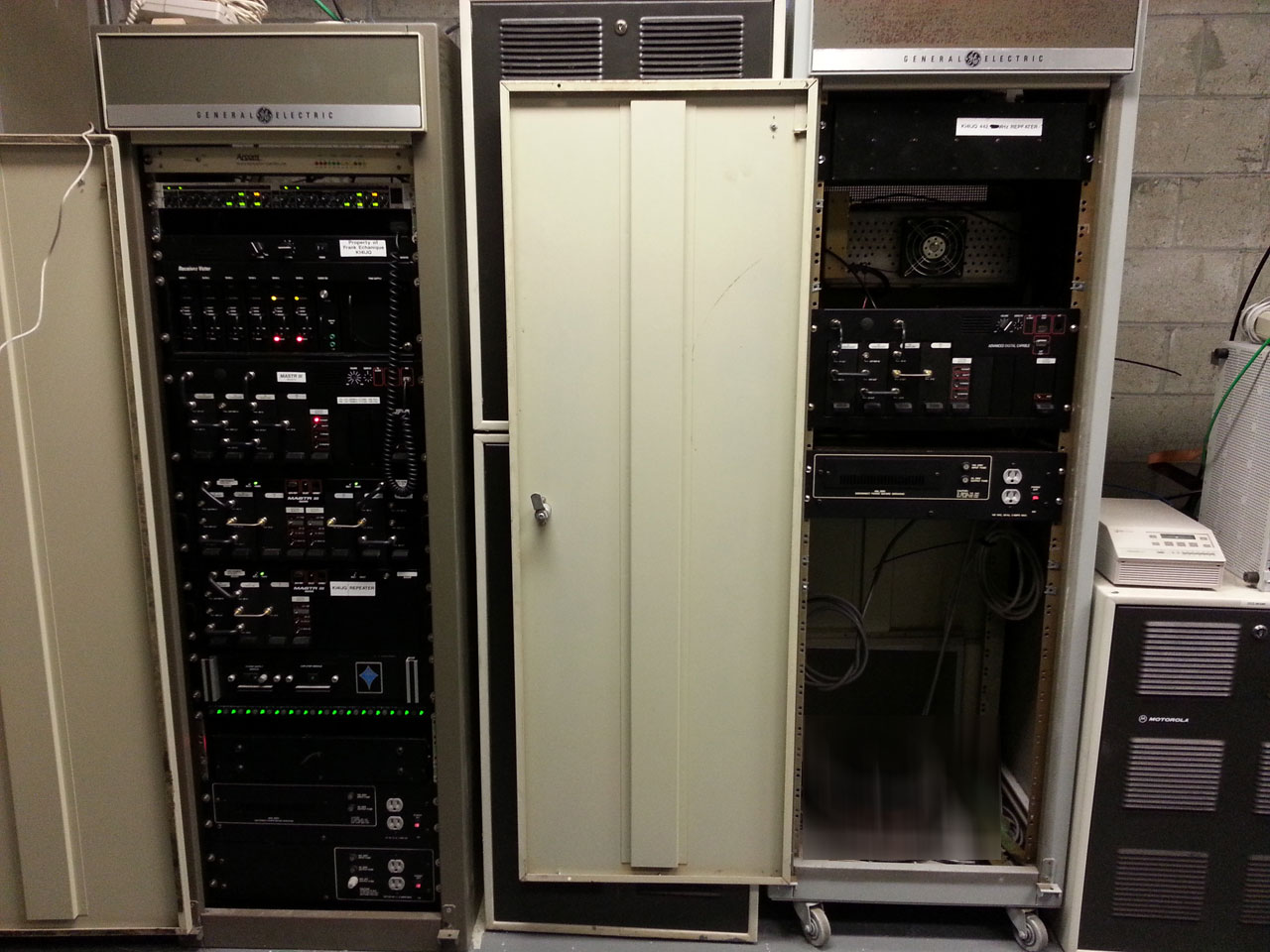
“New” KI4IJQ Repeater

So I finally got around to working on the permanent 147.180Mhz repeater… originally the 147.345Mhz repeater this was supposed to be the permanent repeater, the current one was just temporary… so after 5 or so years in service I figure its about time the real one went up :)

KI4IJQ repeater

so here is the basic layout of the repeater… from top to bottom

1) Audio Compressor – Will normalize (expand/compress) incoming audio before the repeater controller
2) Arcom RC-210 repeater controller – Not sure if this will be the final controller, thinking of getting an S-Com 7330 since I am not totally happy with the Arcom
3) Audio panel – this panel just has a speaker, volume control and selector switch that lets you listen to the audio coming out of each receiver
4) Receiver Voter – basically an audio comparator, as part of a voting system the voter is what decides which receiver is getting the “best” signal and “votes” it, aka passes the audio to the controller
5) Mastr III – this is the actual VHF 2M repeater…
6) Mastr III Receiver Shelf – this has 2x UHF receivers for the satellite receive site links
7) Mastr III Receiver Shelf – this has 1x UHF receiver for satellite receive site links
8 ) UHF Preamplifier/multi coupler – shares one UHF antenna to the 3x UHF receivers
9) Fuse Panel – distributes the high current 12V to all the low current 12V equipment
10) 12V high current power supply – powers everything in the shelf minus any power amplifiers
11) 26V high current power supply – powers the Mastr III VHF PA
12) VHF Mastr III PA – 10mW in 110W out – set to 15W out via software PA pot setting… will be driving a 250W TPL PA

so first thing I had to do was program the all the shelfs…

Mastr III software

mmm DOS

then tune the RX Synthesizer modules…

Mastr III RX Synthesizer module

Red light indicates no lock. There is a tunable capacitor to tweak the VCO.

Mastr III RX Synthesizer Module in Extender Card

using an extender card you tweak the VCO until the red light turns off… then you have to tune the front end…

Mastr III RX Front End

basically a 5 slug filter in front of the receiver to increase selectivity

Mastr III RX Front End

tuning it requires the use of a signal generator… as you get closer to getting it properly tuned you keep turning down your signal until you get it to “ideal”… which ideally should be at -120dBm or better

next up is the transmitter

Mastr III TX test

using the Mastr III DOS software and the PA PWR setting I tuned the Mastr III’s PA to 15W so it could drive a secondary PA, a 250W TPL

I did this for 2 reasons, 1 the Mastr III PA is a lot more difficult/expensive to repair/replace than the TPL, so the TPL will act as a “sacrificial lamb” if anything catastrophic happens to the repeater… 2 once the system gets its satellite receive sites its receive footprint is going to be pretty large, so we need to compensate with more transmit power

VHF Mastr III repeater

done for now… all thats left is to use the service monitor and a TIMS set to set all the audio levels

Wednesday, June 15th, 2011 Uncategorized Comments Off